
04 / DREAMERS FREQUENCIES · 2026.10.30 · VERSION 1.0
WARPDECK
DROP ANY TRACK IN. IT PLAYS IN TIME.
A Max for Live device for Ableton Live. Put it on an audio track and every clip on that track is analysed, gridded and warped to your set's tempo, with bar 1 on the first downbeat. Then the channel plays like a DJ deck: loops, beat jumps, a 4-band isolator with kills, a filter and a dub echo, from Session view or Push.
WHAT IT IS
THE IDEA IN 20 SECONDSTracks dragged into Live often land a little wrong: a tempo guess that's off, bar 1 on a silence, a grid that slowly drifts. WARP DECK listens to every clip, finds its tempo and its first downbeat, and warps it onto Live's grid. Change the set's tempo and everything follows. Then the channel becomes a deck you can play.
THE NAME: "WARP" IS WHAT ABLETON LIVE CALLS STRETCHING AUDIO ONTO ITS GRID. A "DECK" IS WHAT A DJ PLAYS FROM. PUT THE SAME DEVICE ON THE MAIN TRACK AND IT BECOMES THE HUB: ONE SCREEN FOR EVERY CHANNEL OF THE SET.
AUTO-WARP
FROM A FILE TO A GRID · TRY ITThe track below was made in your browser a moment ago, at a tempo nobody told this page. Press ANALYSE and the page runs WARP DECK's own tempo search on it: three-band spectral flux, a novelty curve, then a comb search folded into 78 to 180 BPM. Then use the grid tools exactly as they are on the device, and press HEAR THE GRID for a click on every beat it found.
- 01LISTEN16 KHZ
The file is read at 16 kHz and cut into 512-sample frames, 100 a second. In each frame the rise in loudness is summed in three bands: below 150 Hz, 150 Hz to 2 kHz, and above.
- 02NOVELTYFLUX
The low band counts one and a half times. The slow trend is taken out, leaving a curve that jumps at every hit.
- 03TEMPO— BPM
The curve is compared with itself at every possible beat length. The best fit is folded into 78–180 BPM, checked against double and half time, then refined over 32 beats.
- 04GRID + BAR 1—
The grid is slid until its lines sit on the hits, and bar 1 goes on the first downbeat, not on the file's first sample.
- 05WARPLIVE
Warp markers go in, Complex Pro by default, and from then on Live follows every tempo change by itself. If Live had already found the right tempo, its own phase is kept and only bar 1 moves.
THE DECKS
TWO TRACKS · ONE CROSSFADER · PLAY ITTwo tracks at two different tempos. Each deck runs WARP DECK's own audio code, ported line for line to your browser: the 4-band isolator and kills, Drums / Harmonics, the filter, the echo and the gain. Deck B starts with AUTO WARP off, so it plays at its own tempo and drifts. Switch it on and it locks to the set. Every control starts at rest, and at rest the deck passes the sound through untouched.
LIVE-SAFE
EIGHT RULES IT NEVER BREAKSIt is meant to be dropped on a channel in the middle of a set. So it follows a few rules about what it may touch, and when.
EVERY PARAMETER
34 · ON PUSH, IN AUTOMATION, ON ANY MIDI MAPEvery control is a Live parameter, so it shows up on Push in five banks, can be automated, and can be mapped to any controller with Cmd+M. The action buttons (jumps, Re-Grid, Next) fire on every press. Here they are, bank by bank, each with what it does in motion.
USE CASES
HOW IT GETS PLAYEDHOW IT WAS BUILT
TEN STEPS FROM BRIEF TO RELEASESEE IT
THE REAL SCREENS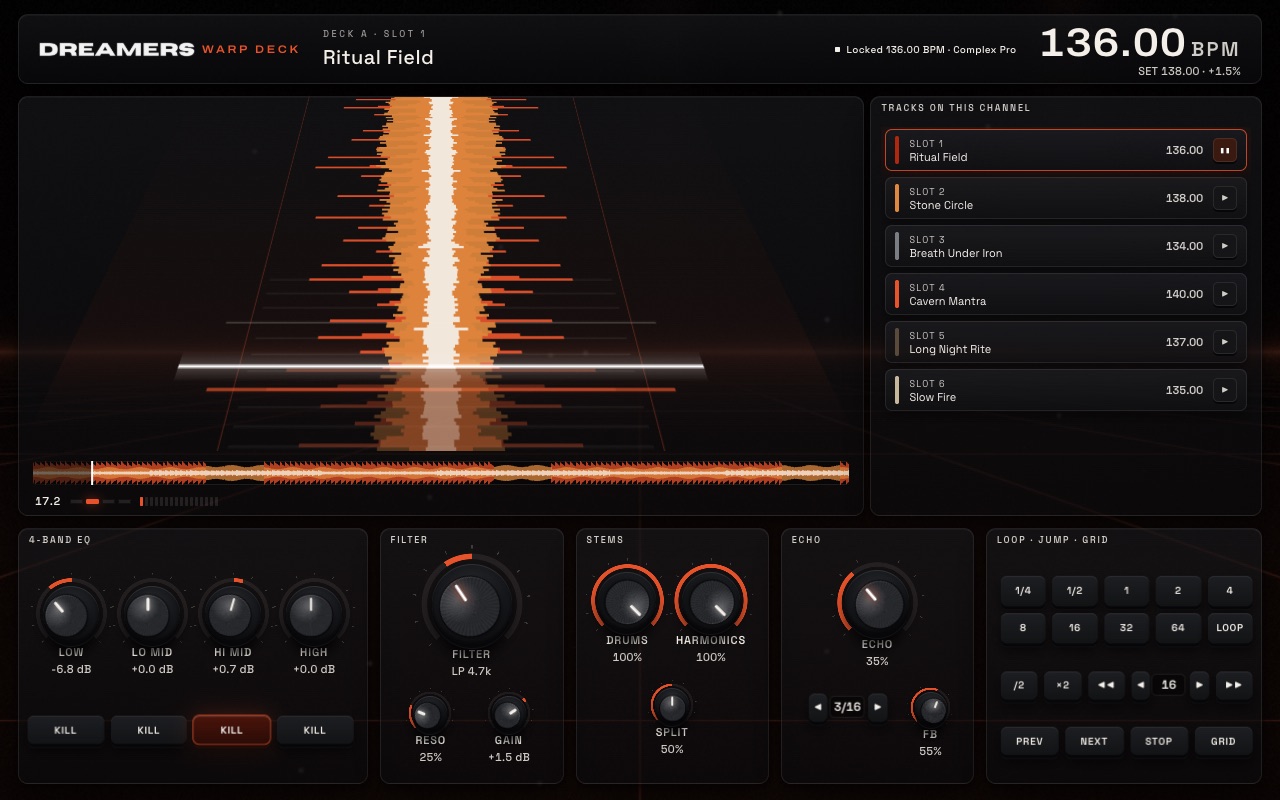
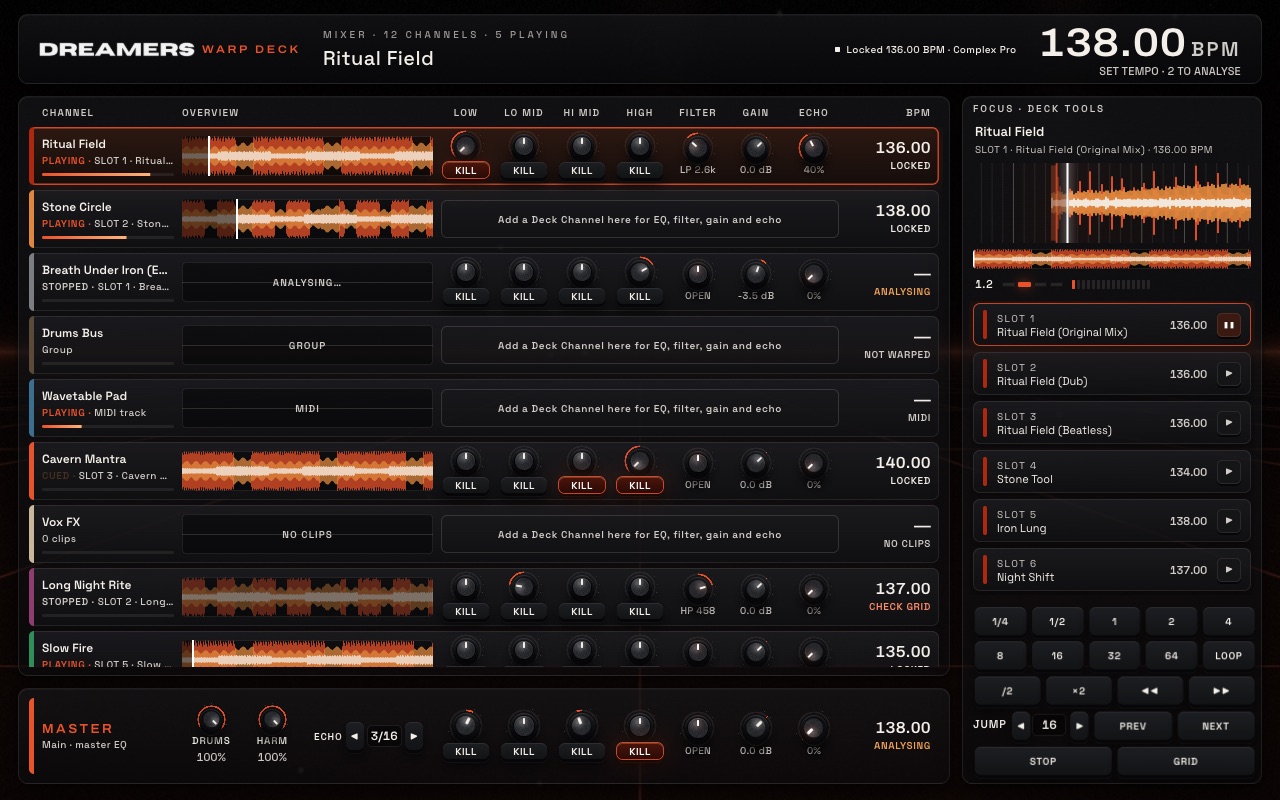
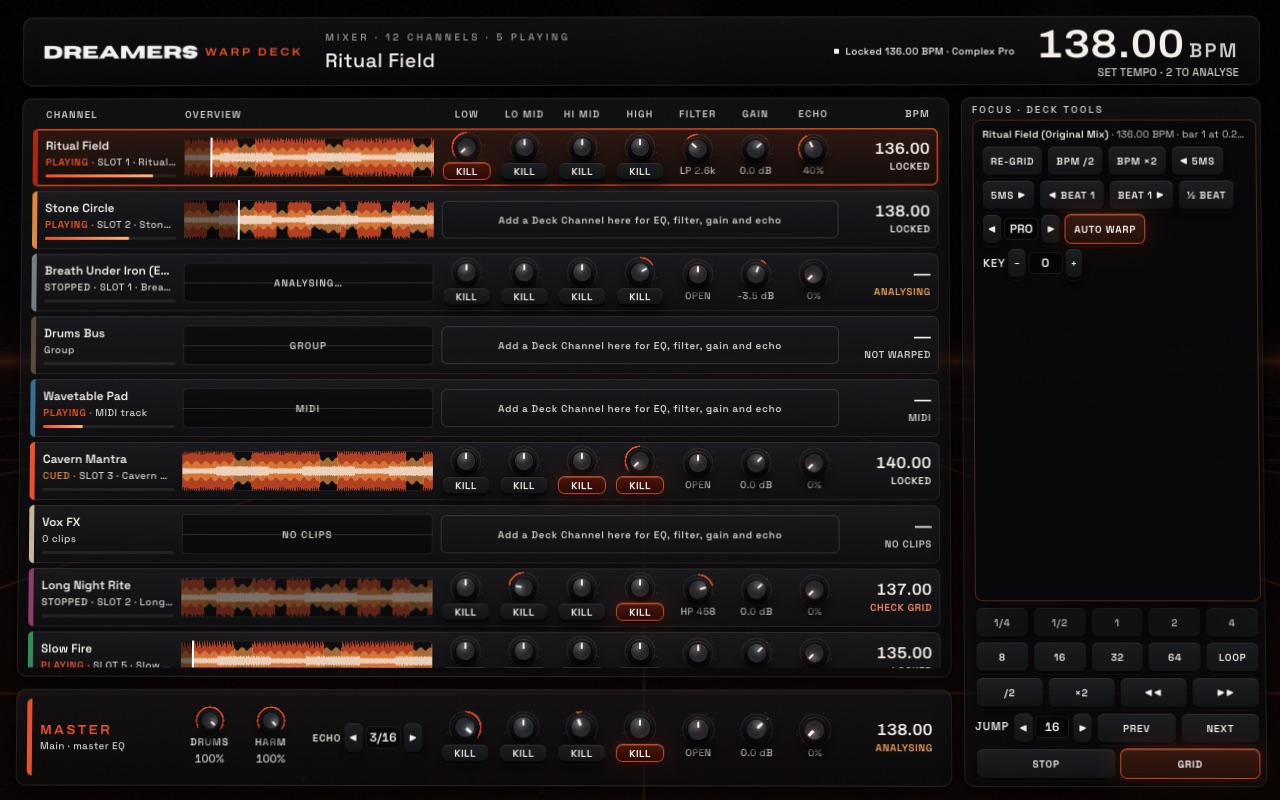


SPECS + LICENCE
WHAT YOU NEED · WHAT YOU GET- FORMAT
- Max for Live audio effects: DREAMERS WARP DECK and DREAMERS DECK CHANNEL, plus the screen file and a step-by-step READ ME
- LIVE
- Ableton Live 12.2 or later with Max for Live (Live Suite, or Standard with the Max for Live add-on), Max 9. Made and tested on Live 12.4
- SYSTEM
- macOS. Windows is not supported yet
- ANALYSIS
- Tempo found between 78 and 180 BPM, up to 12 minutes of each file, in slices of a few milliseconds so Live never stalls
- CONTROLLERS
- Push in five banks: EQ, Mixer, Loop, Grid, More. Any other controller with Live's MIDI mapping
- SCREENS
- A strip inside Live's device view, and a full window that floats above Live (Deck, or Mixer on Main)
- TRIAL
- 20 minutes of real use, free, with a DREAMERS account
- LICENCE
- One payment · one computer at a time · works offline forever once bought
- ALSO
- DREAMERS PULSE FIELD free with it
DOES IT CHANGE MY SOUND WHEN I DROP IT ON A PLAYING TRACK?
No. While every control is at rest the audio passes through bit for bit, and a clip that is being heard is never rewritten. Small tempo errors glide onto the grid ahead of the playhead; bigger fixes wait until the track stops.
IS DRUMS / HARMONICS STEM SEPARATION?
No. It is a real-time split of each band into its hits and its sustained sound, with a sensitivity control (SPLIT). For clean stems use Live 12's own Separate Stems, or DREAMERS PRISM on a backing track.
WHAT HAPPENS WHEN THE TRIAL ENDS?
The device passes your audio through untouched and leaves your set alone until you buy. Nothing you are playing changes.
DOES IT WORK ON PUSH 3 STANDALONE?
The controls work on Push 3 standalone, but the 3D screen is not shown there.
MY MP3 GRID SITS A FEW MILLISECONDS OFF.
Live and Max can decode an MP3 slightly differently. Press GRID < or GRID > (5 ms a press) to line it up.
WHAT IS DREAMERS DECK CHANNEL?
A small device for any channel you want to shape from the Hub on Main: its own 4-band EQ and kills, filter, Drums / Harmonics, echo and gain, with zero latency. It follows the Hub's licence.
IS IT IN THE STUDIO BUNDLE?
Yes. The STUDIO BUNDLE (₹5,999) has every DREAMERS plug-in and app except ATLAS, and the free HUB installs them all.
04 / DREAMERS WARP DECK