
08 / DREAMERS FREQUENCIES · 2026.11.02 · VERSION 1.1
CUE
HEAR IT IN YOUR HEADPHONES. DROP IT ANYWHERE.
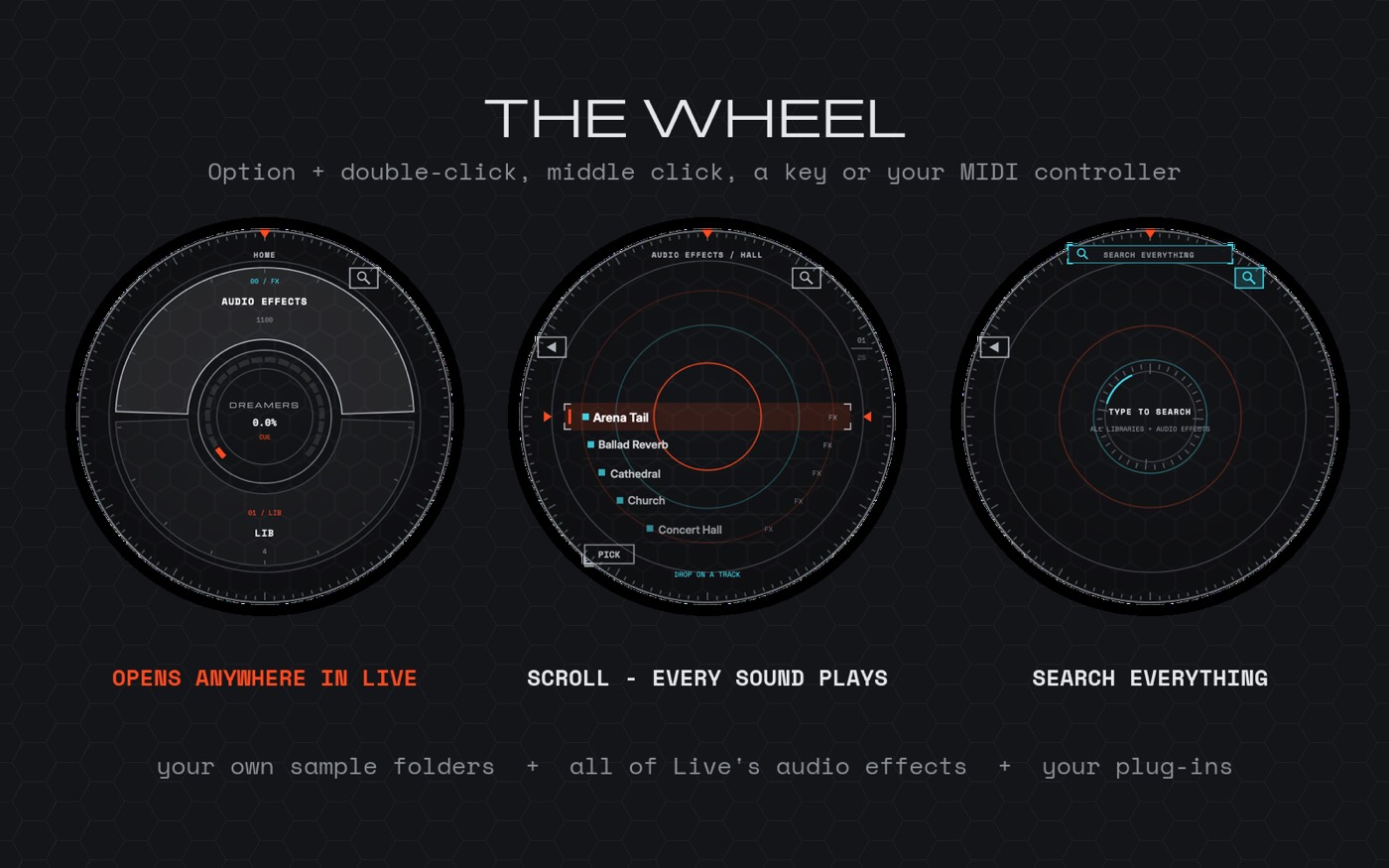
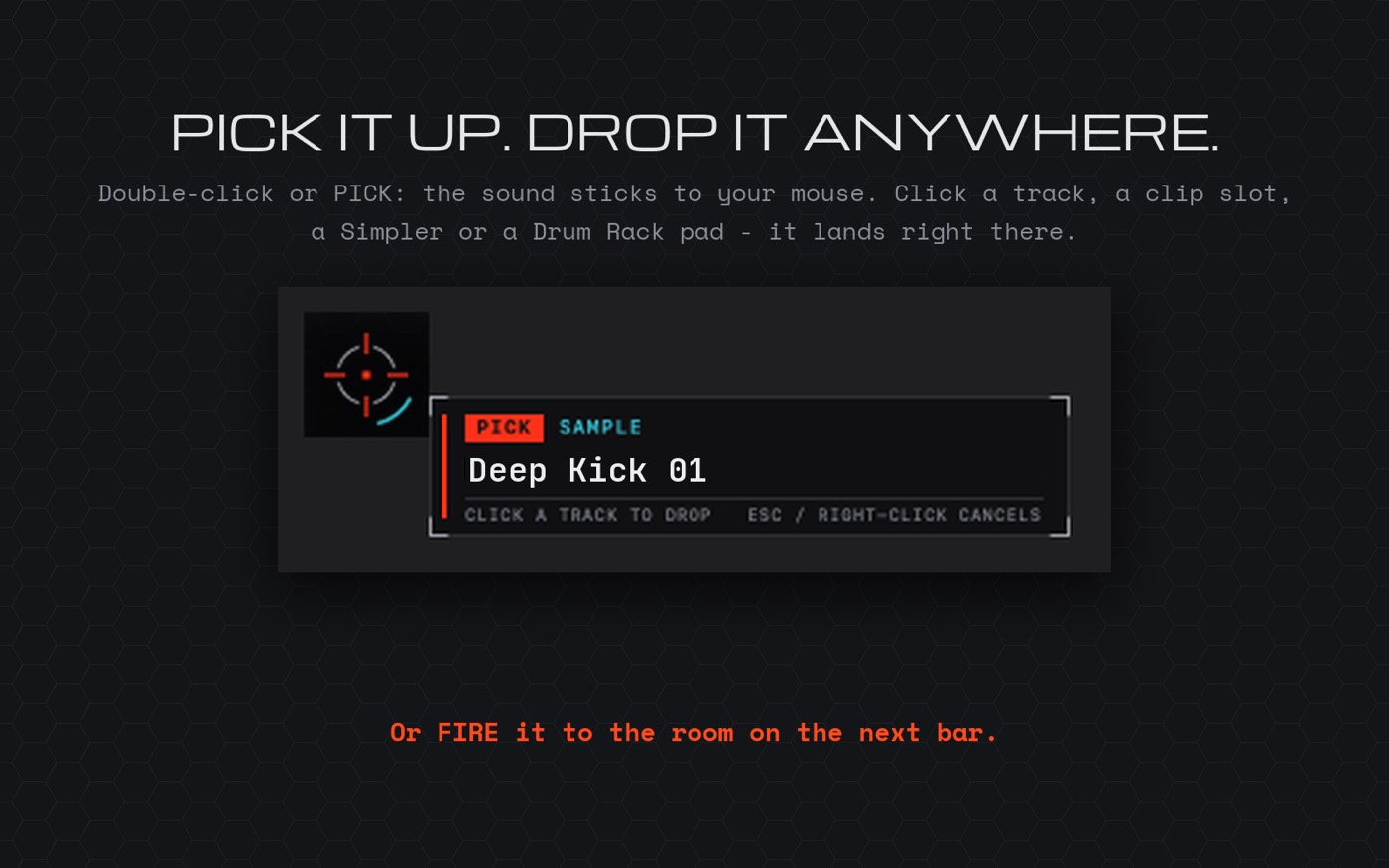
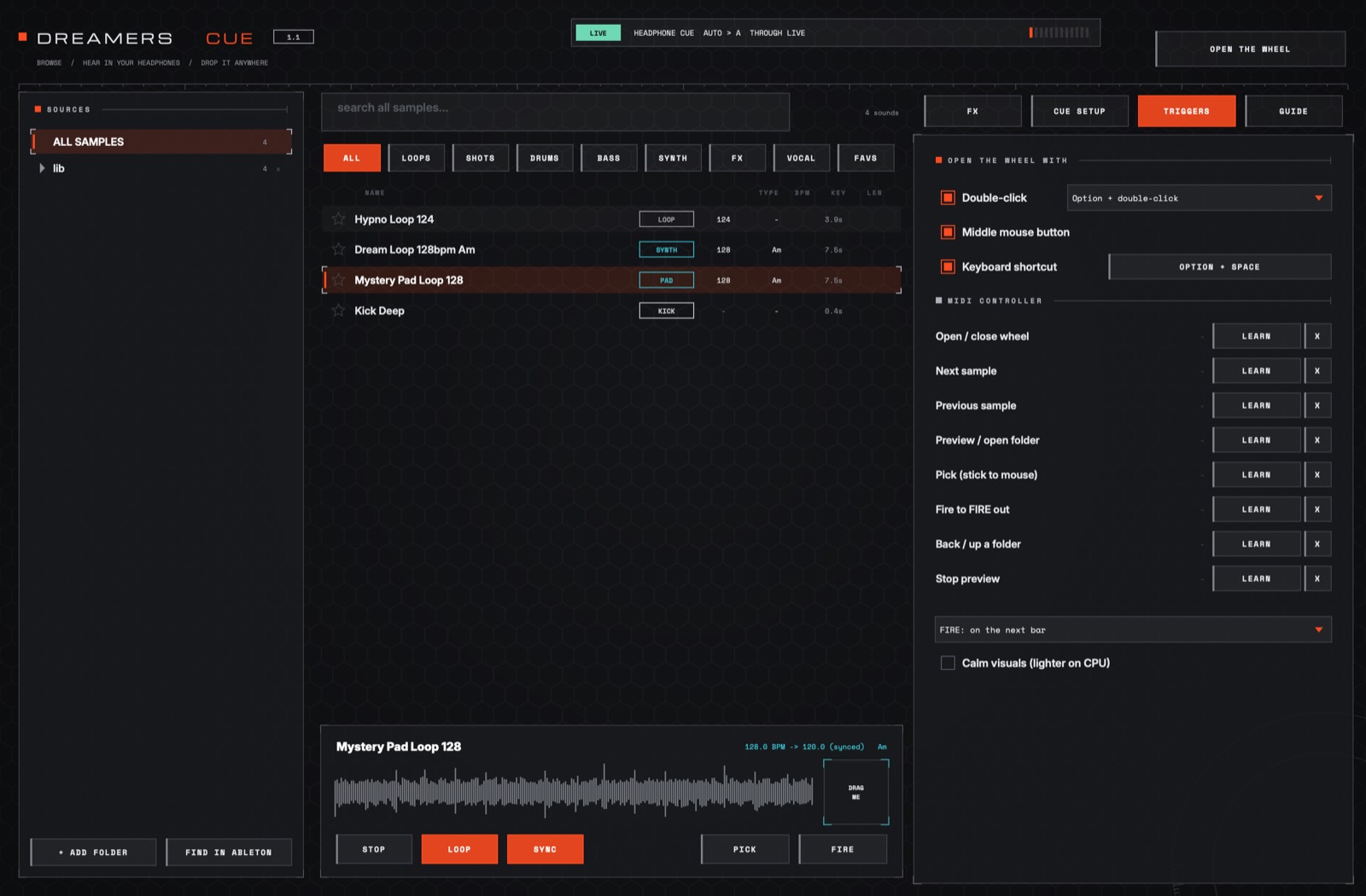
A sample wheel that opens under your mouse anywhere in Ableton Live. Spin it and every sound plays in your headphones only, never through the Master. When one is right, pick it up: it sticks to the pointer and lands on whatever track, clip slot, Simpler or Drum Rack pad you click.
FREE WITH ANY PAID DREAMERS PLUG-INOR WIN IT IN THE MAZE · MAC · VST3 + AU
WHAT IT IS
THE IDEA IN 20 SECONDSFinding the next sound in the middle of a set means leaving the music: digging through the browser, wiring a preview that you can hear and the crowd can't, then dragging the file to the right lane. CUE keeps your hands in the set. The wheel finds the sound, your headphones audition it, the room hears nothing until you decide.
THE NAME: IN A DJ BOOTH, TO CUE A RECORD IS TO HEAR IT IN YOUR HEADPHONES BEFORE THE CROWD DOES. CUE DOES THAT FOR EVERY SAMPLE, LOOP AND AUDIO EFFECT ON YOUR MAC.
PLAY IT
WHEEL · HEADPHONES · ROOM · DROPA small DREAMERS demo kit, made in your browser. Start the room, then spin the wheel: every sound you land on plays on CUE. Switch LISTEN AS to THE CROWD and the preview disappears. Press PICK (or double-click a sound) and drop it on a lane: from then on the room plays it. FIRE sends it straight to the room on the next bar.
IN YOUR BROWSER BOTH COME OUT OF THE SAME SPEAKERS. IN LIVE, CUE GOES TO YOUR HEADPHONES ONLY.
PREVIEW FX
FILTER → DRIVE → YOUR PLUG-INS → ECHO → SPACEShape the sound while you audition it. The chain runs on the preview, on FIRE, and, if you switch on DRAG / PICK WITH FX, it is printed into the file you drop. Drag a knob up or down. Double-click to reset. These are the plug-in's real ranges and formulas.
Load up to four of your own VST3 or Audio Unit plug-ins into the preview: + ADD PLUG-IN lists what is installed on your Mac, or browse for a file. EDIT opens its window, ON bypasses it, X clears the slot. They run in the headphone preview and are copied into the renders for FIRE and for drag-with-FX.
HEADPHONE CUE
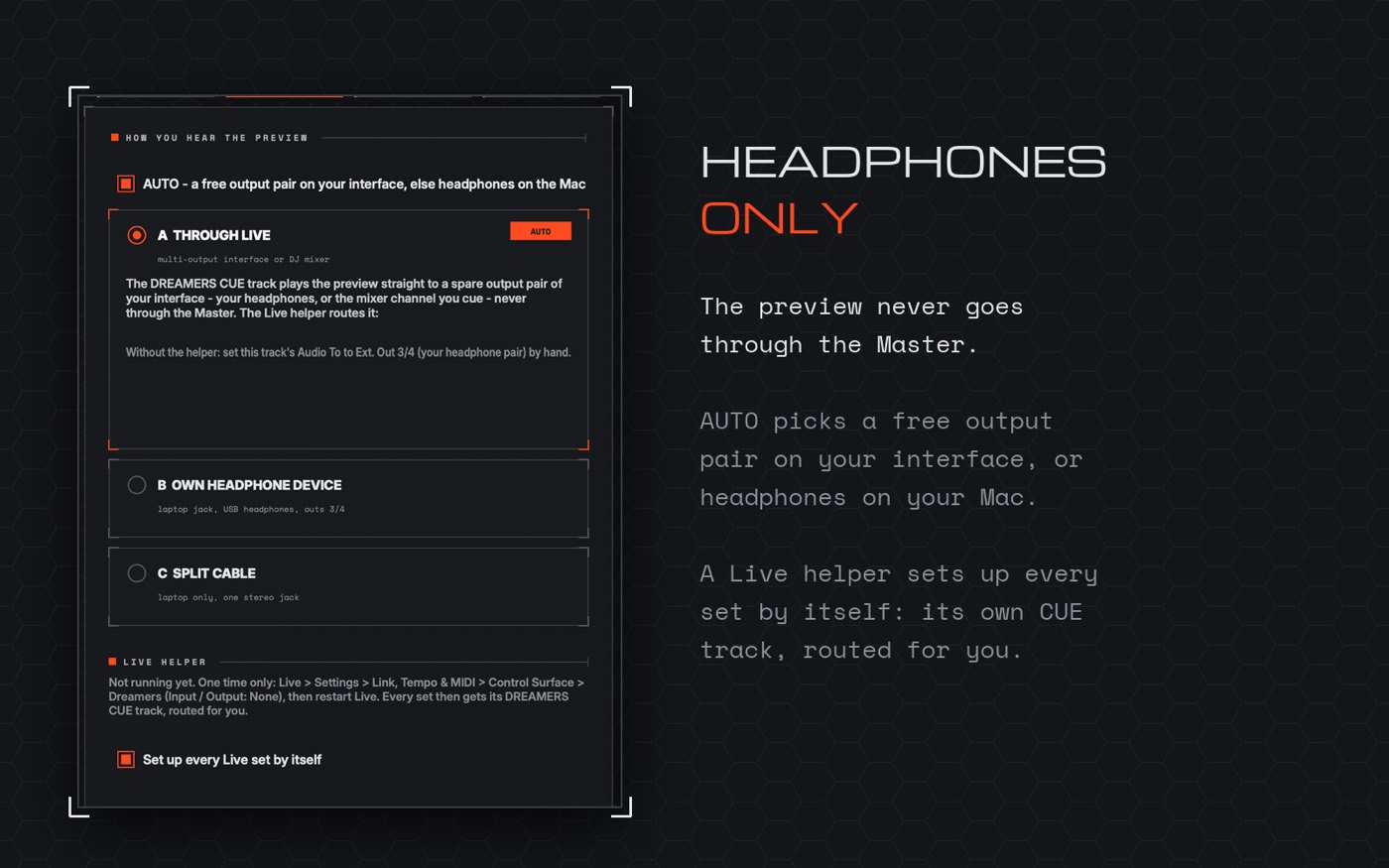
AUTO + THREE ROUTES · EVERY RIGCUE makes two kinds of sound. CUE is what you audition: it should only reach your headphones. FIRE is a sample you choose to play to the room, on the beat. CUE SETUP picks how the preview reaches your ears. Leave it on AUTO and it checks your rig every few seconds.
CUE installs a small helper into Live. Switch it on once: Live > Settings > Link, Tempo & MIDI > Control Surface, choose Dreamers in a free slot (Input / Output: None), restart Live. From then on every set gets a DREAMERS CUE MIDI track with the plug-in on it, routed straight to your headphone outputs and never through the Master, plus a DREAMERS FIRE audio track that plays FIRE to the Master.
DON'T WANT TRACKS ADDED TO EVERY SET? UNTICK "SET UP EVERY LIVE SET BY ITSELF" IN CUE SETUP.
WHICH SETUP IS YOURS
EVERY CONTROL
ALL OF THEM · EACH ONE ANIMATEDThe wheel, the main window's four tabs (FX, CUE SETUP, TRIGGERS, GUIDE) and every button in them. Pick a group.
USE CASES
HOW IT GETS USEDHOW IT WAS BUILT
TEN STEPS FROM BRIEF TO RELEASESEE IT
THE REAL PLUG-IN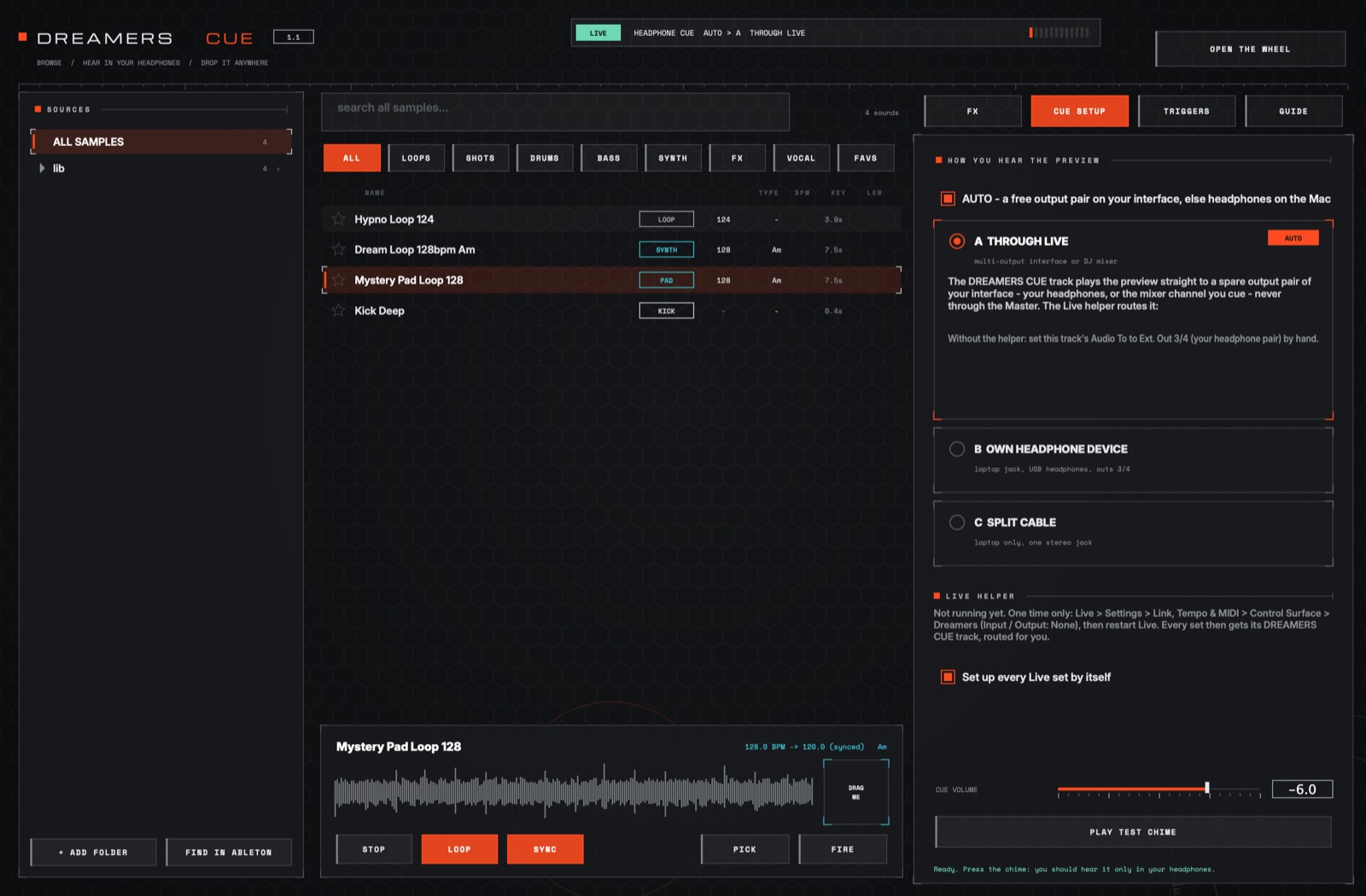
SPECS + LICENCE
WHAT YOU NEED · WHAT YOU GET- FORMATS
- VST3 and AU instrument (CUE) + VST3 / AU audio effect (CUE SPLIT, only for the split-cable setup)
- SYSTEM
- macOS 11 or later · Apple Silicon and Intel downloads
- HOST
- Made for Ableton Live: the wheel, PICK and the helper work inside Live
- FILES
- WAV, AIFF, FLAC, MP3 and OGG from your own folders, found in Live's Places and User Library on first open
- OUTPUTS
- Two stereo buses: CUE (the preview) and FIRE (to the room, on the beat)
- SAMPLES
- None included. CUE uses the sounds you already have
- TRIAL
- 20 minutes of real use, free, with a DREAMERS account
- LICENCE
- Free with any paid DREAMERS plug-in or app, or pay what you want from ₹199 · one computer at a time · works offline forever once it's yours
WILL THE CROWD HEAR MY PREVIEW?
Not on AUTO, A, B or C. The preview never goes through the Master. Press PLAY TEST CHIME in CUE SETUP: you should hear the bell in your headphones only, never in the speakers. If it comes out of the speakers, the DREAMERS CUE track's Audio To is on Master: change it, or switch to B.
I ONLY HAVE A LAPTOP. CAN I STILL CUE?
Yes. Best: B with a cheap USB headphone adapter, speakers on the Mac's jack, headphones on the adapter. No adapter? Use C: a stereo 3.5 mm to two mono Y-cable and CUE SPLIT last on the Master. The left plug carries the whole mix in mono to the speakers, the right plug carries the preview to your headphones.
DOES IT COME WITH SAMPLES?
No. CUE reads the folders you already use in Live (its Places and your User Library) the first time it opens. Add more with + ADD FOLDER or FIND IN ABLETON. The demo kit on this page only exists in your browser.
CAN I PREVIEW LIVE'S OWN AUDIO EFFECTS?
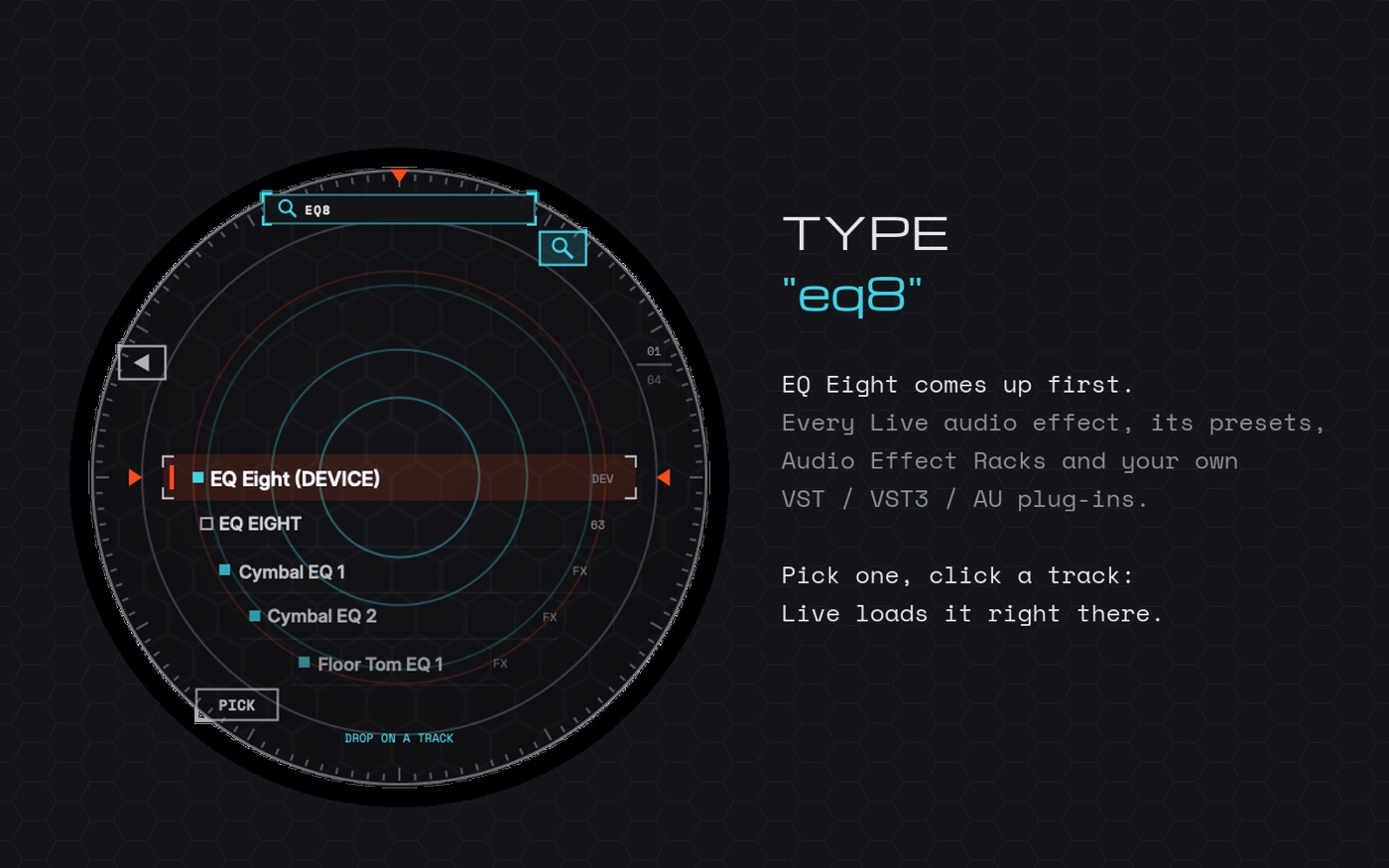
You can browse and search them in the wheel: every Live audio effect, its presets, Audio Effect Racks and your own VST / VST3 / AU plug-ins. Pick one and click a track: Live loads it right there.
DO LOOPS PLAY IN TIME?
With SYNC on, loops are stretched to your set's tempo, and FIRE waits for the next beat or bar (your choice in TRIGGERS). BPM comes from the file name or the loop length, and the key is read from the name or detected from the audio.
WHAT HAPPENS WHEN THE TRIAL ENDS?
The plug-in goes silent and locks until it's yours. Your Live set keeps working.
HOW DO I GET IT FREE?
Buy any paid DREAMERS plug-in or app and CUE comes with it. It is also inside the STUDIO BUNDLE, and you can win it in the maze in the shop. Or pay what you want for it on its own, from ₹199.
IS IT IN THE STUDIO BUNDLE?
Yes. The STUDIO BUNDLE (₹5,999) has every DREAMERS plug-in and app except ATLAS, and the free HUB installs them all.
08 / DREAMERS CUE
SPIN. HEAR.
DROP.
FREE WITH ANY PAID DREAMERS PLUG-IN