
10 / DREAMERS FREQUENCIES · 2026.11 · VERSION 2.7.0
ATLAS
YOUR WHOLE LIBRARY, MAPPED. THEN PERFORMED.
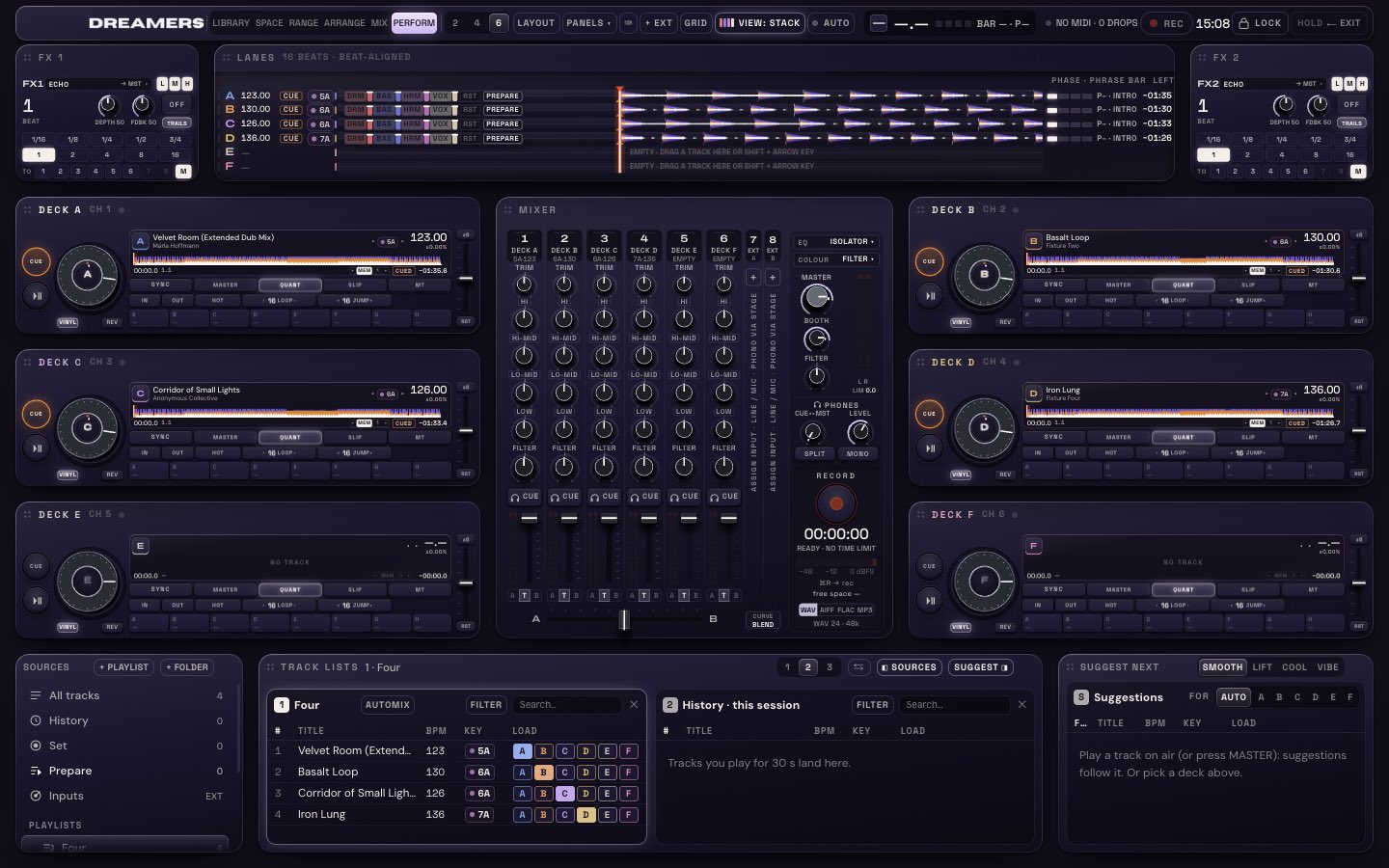
Your music sits in folders, on drives and inside other DJ apps. ATLAS pulls it into one library, hears every track's genre, BPM, key and energy, and files it where you can find it. It tells you what mixes next, helps you build the set and plays it on up to six decks with stems, FX and Automix. It writes a USB that plays on Pioneer CDJs, no rekordbox needed. Offline, on your Mac. New in BETA: friends, chat, track sending and a B2B room. Voice chat is coming.
₹24,999 LIFETIME · ₹699 / MONTH
WHAT IT IS
THE IDEA IN 20 SECONDSOne app for everything between your folders and the booth.
ONE PLACE FOR
- YOUR WHOLE LIBRARY
- Folders, drives and your rekordbox, Serato or Traktor library.
- KNOWING EVERY TRACK
- Genre, BPM, key and energy, heard from the audio, offline.
- THE SET
- What mixes next, a 3D key map, playlists, Automix, a MIX view.
- THE DECKS
- Up to six decks, four stems each, 21 effects, recording.
- THE CDJS
- A USB that plays on Pioneer CDJs. No rekordbox needed.
- QUIET TRACKS
- Harmonize lifts the clearly quiet ones. Originals never change.
- FINDING ANYTHING
- Type what you want and the assistant takes you there. Offline.
- PLAYING TOGETHER BETA
- Friends, chat, track sending and a B2B room to hear your set.
- VOICE CHAT COMING
- Talk to friends inside ATLAS. Shared B2B decks are in the works.
THE NAME: AN ATLAS IS A BOOK OF MAPS. HERE THE MAP IS YOUR MUSIC: KEY AS ANGLE, TEMPO AS DISTANCE, ENERGY AS HEIGHT, AND EVERY TRACK A POINT YOU CAN TRAVEL TO.
THE ANALYSIS
PLAYGROUND · A LIBRARY BEING HEARDTwelve made-up tracks have just landed. Press ANALYSE and watch ATLAS work through them several at a time: tempo, key, energy, then genre. Tap a finished track to see its key on the Camelot wheel and what ATLAS would play next. The key scores and the suggestion maths are the app's own.
OUTER RING = MAJOR (B) · INNER RING = MINOR (A)
THE BOOTH
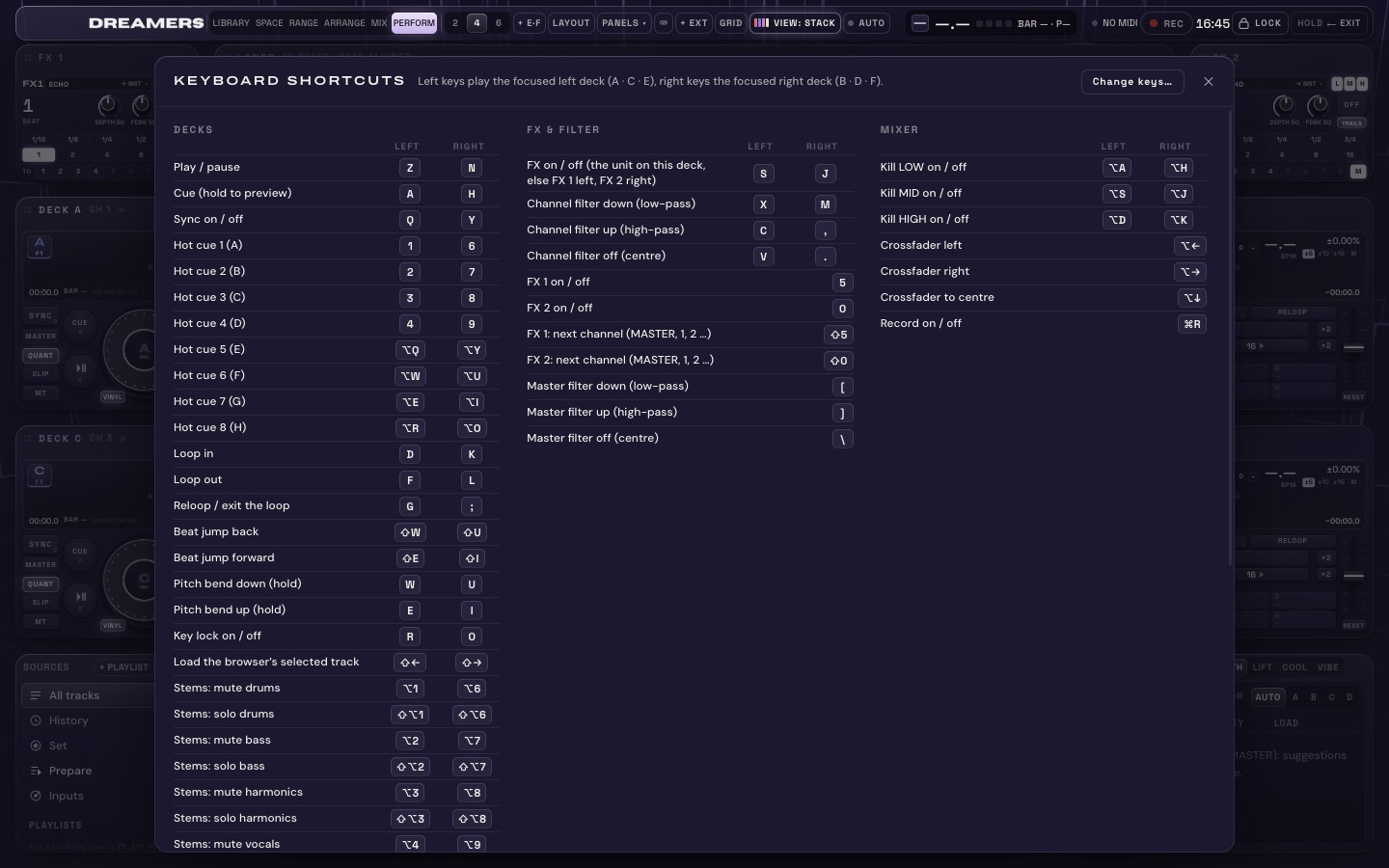
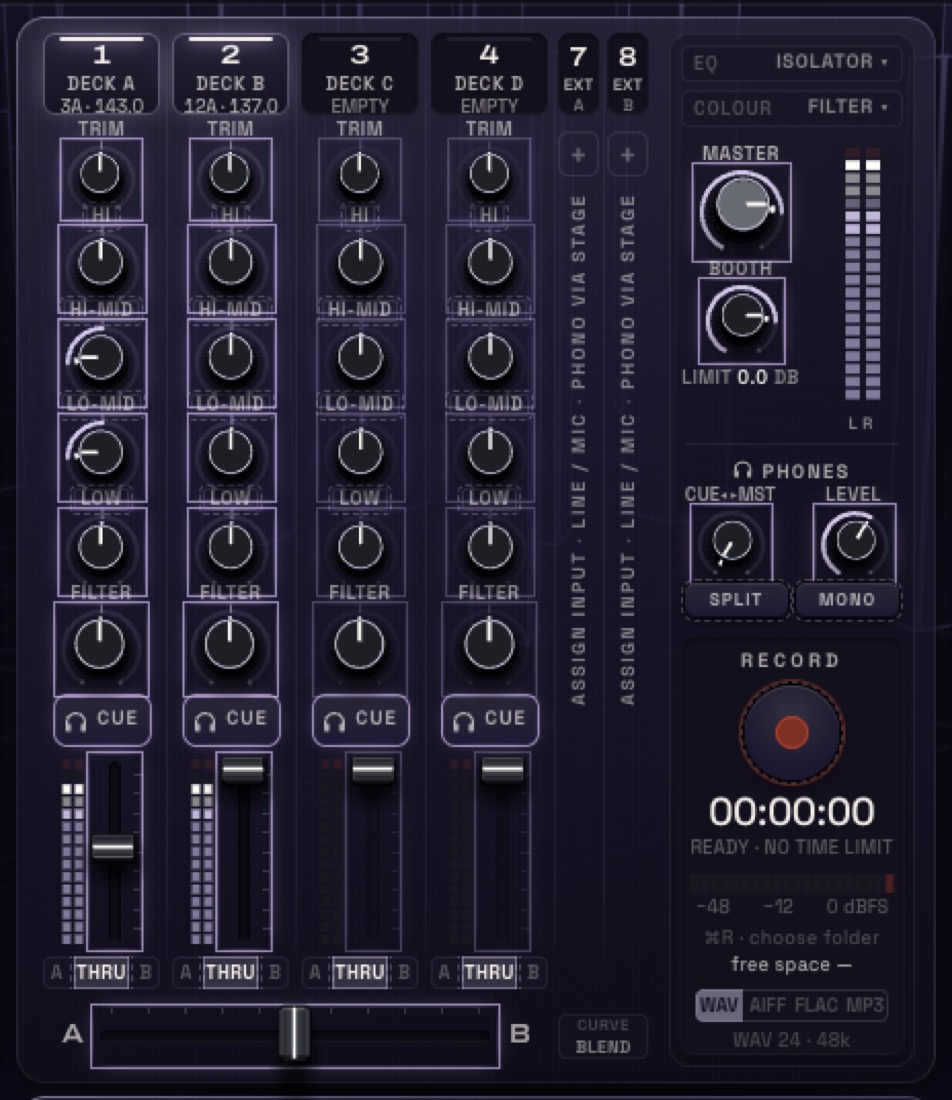
PLAYGROUND · TWO DECKS + THE MIXERLoad two analysed tracks onto the decks (drag a row, or press A or B in the list) and mix them. Each loop is made in your browser at that track's tempo and key. SYNC matches the tempo, the four-band EQ is an isolator with a kill on every band, and the crossfader has the app's three curves. ATLAS's own keys work here too: Z and N play, Q and Y sync, ⌥A ⌥S ⌥D and ⌥H ⌥J ⌥K kill, ⌥← ⌥→ ⌥↓ move the crossfader.
LOAD TWO TRACKS
EVERY CONTROL
WHAT'S NEW IN 2.7.0 · EACH FEATURE GROUPEverything ATLAS does, grouped the way the app is: the library, the analysis, Perform, the mix tools and the way out to other gear. Each card moves the way the feature does.
NEW IN 2.7.0 · 24 NOV 2026
- PLAY FROM A DRIVE · BETA
- New: plug in a pen drive or SSD and it shows in ATLAS. Open it to see its folders and tracks, and the rekordbox, Serato and Engine DJ playlists on it. Drag a track onto a deck, or double-click it: it plays straight from the drive and nothing is copied to your computer. WAV, AIFF, FLAC, MP3 and AAC / M4A files play from a drive; other formats show dimmed.
- ANALYSIS ON THE DRIVE
- ATLAS asks once for each drive before it writes anything to it. If you agree, the analysis (BPM, key, beat grid, waveform, cue points) is kept in a small hidden folder on the drive, so any computer running ATLAS reuses it. If you say no, or the drive is locked or full, it is kept on your computer instead. rekordbox and Engine DJ cue points and grids are reused, not analysed again.
- IF THE DRIVE COMES OUT
- A track that is already loaded on a deck keeps playing to its end. Other tracks show DRIVE REMOVED until the drive is back. EJECT inside ATLAS refuses while a deck is playing from the drive.
- LIBRARY LINKS
- Add drive tracks to your Library and playlists without copying them. They show OFFLINE while the drive is unplugged. COPY TO COMPUTER brings a track in with its cues when you want it.
- SHARED DECKS · BETA
- New in FRIENDS: PLAY TOGETHER. Up to four DJs play on the same six decks and mixer from different places. Every computer plays the set itself, in sync. Last touch wins, a marker shows who is holding a control, and you can lock a deck. Each DJ has their own headphone cue, and TALK lets you speak to each other; it never goes into the mix or the recording.
- ROOM CRATE AND LISTENERS
- Each DJ adds tracks from their own library to the room’s shared crate; they are copied to the other DJs for that room only and removed when it ends. The host’s recording gets a tracklist that credits who played each track. Friends can also join a room just to listen. A friend on an older ATLAS joins as a listener.
- USB DEVICES
- Fixed: the list shows only real external drives. Internal volumes and mounted installer images no longer appear.
- FIXED
- In a B2B room with split cue switched on, a listener heard the host’s headphone mix. Listeners now always get the main mix.
- BETA
- PLAY FROM A DRIVE has been tested with test drive images, not yet with every kind of real drive or on a CDJ. SHARED DECKS has been tested with copies of ATLAS on one Mac, not yet between computers over the internet. SAVE BACK TO REKORDBOX (cue points and loops) is included but off: it is under Settings › Labs and is not yet tested on CDJs. Windows remains untested.
NEW IN 2.5.0 · 18 NOV 2026
- FRIENDS · BETA
- New: add other ATLAS members as friends. Pick a name, share your friend code, add theirs. Your e-mail is never shown to anyone. Open FRIENDS from the people button in the top bar, from HOME, or in Settings › Friends. For ATLAS members (bought or subscribed).
- CHAT
- Talk to friends who are online, inside ATLAS. Messages are not stored on our servers and disappear when you quit.
- SEND TRACKS
- Send a track's details (title, artist, key, BPM), or the track itself if you made it or have the right to share it. Your friend sees what it is and chooses whether to accept. The file goes straight from your computer to theirs (up to 250 MB), is checked on arrival, and is added to their library and saved in Downloads › DREAMERS ATLAS FROM FRIENDS.
- B2B ROOM
- Invite a friend into your room. They see your decks live (tracks, keys, tempos, what is playing) and, when they press LISTEN, hear your master output. ATLAS measures the delay between your two computers and shows it.
- WHILE YOU PLAY
- While a deck is on air, messages and invites wait quietly as a count on the FRIENDS button. Block or report anyone at any time.
- BETA
- FRIENDS is new and marked BETA. Rooms and track sending connect your two computers directly, so each of you learns the other's internet address, and some networks do not allow a direct connection yet. Chat works either way. Tested so far with two copies of ATLAS on one Mac, not yet between two computers over the internet.
- PLANNED NEXT
- Playing B2B on your own decks from two places, locked to the same beat.
NEW IN 2.4.10 · 18 NOV 2026
- HOME
- Come back to the welcome screen any time. Click the DREAMERS | ATLAS mark at the top left, in every view, or the small house button beside it (shown when the top bar has room). Or press Cmd+Shift+H (Ctrl+Shift+H on Windows), or ask the assistant for "home". It is also in the menu: DREAMERS ATLAS › Home on Mac, File › Home on Windows.
- NOTHING STOPS
- Going HOME stops nothing. Music keeps playing, a recording keeps recording and running jobs carry on. Esc takes you back exactly where you were.
- GO STRAIGHT TO
- The welcome screen has a new row, OR GO STRAIGHT TO: LIBRARY, SPACE, RANGE, ARRANGE, MIX, AUTOMIX, STUDIO, PERFORM, SETTINGS and ASSISTANT. One press takes you there.
- CHANGED
- The DREAMERS | ATLAS mark in the Library used to open the Library. It now opens HOME, in every view.
NEW IN 2.4.9 · 18 NOV 2026
- WELCOME
- When ATLAS opens it greets you by the time of day and the day of the week and asks WHAT DO YOU WANT TO DO TODAY? Pick BUILD A SET, RECORD A MIX, PLAY / PRACTISE, ADD MUSIC, PREPARE A USB FOR CDJS, TIDY MY LIBRARY or JUST LOOK AROUND, and ATLAS takes you to the right place. A choice may ask one or two short questions, each one skippable. Enter ATLAS goes straight in without answering. The welcome never starts anything on its own: nothing is written or recorded until you do it. Switch it off in Settings › Assistant.
- ASSISTANT
- Type what you are looking for, a feature, a setting, a playlist or a track, and the assistant takes you there. It works offline. Open it with Cmd+K (Ctrl+K on Windows), with Option+double-click (Alt+double-click on Windows) on an empty part of the window, or by clicking its floating icon.
- YOUR ICON
- Drag the assistant's icon anywhere. Choose one of six icons or your own picture, and set its size, colour and see-through level. Make it invisible, or switch the assistant off entirely. All in Settings › Assistant.
- TRACK SEARCH
- Track search is now Cmd+F (Ctrl+F on Windows). While the assistant is on, Cmd+K opens it; with the assistant off, Cmd+K searches as before.
- SPACE
- In the 3D map, a new ALL button brings every track back after you have clicked a track or chosen a filter. Esc does the same.
NEW IN 2.4.8 · 18 NOV 2026
- HARMONIZE IN THE LIBRARY
- Harmonize is no longer only part of Export. Start it on the whole library, a playlist, a selection or a single track. ATLAS measures the tracks and shows the review sheet, where you can hear Original and Harmonized before anything is written. By default only the clearly quiet tracks are lifted.
- ORIGINALS
- Your original files are never changed. A harmonized track gets its own file and an HZ badge, and ATLAS plays that version in the player, on the decks and in automix. Switch back with Use original, or remove the version. Settings shows how much space the versions take.
- EXPORT
- Exports that copy music, to a folder or to a CDJ / rekordbox drive, write the harmonized version. Exports that only point at your files keep pointing at the originals.
- TAGS
- Tag edits made in ATLAS keep a track's harmonized version.
NEW IN 2.4.7 · 17 NOV 2026
- EQ ON WAVEFORM
- In Perform, each deck's waveform follows that channel's EQ and KILLs as you move them. Turn the lows down and the low band and the kick spikes shrink; the same for mids and highs. On by default, with a switch in Settings › Appearance.
- IMPORTS
- A very long track at the front of the queue no longer holds up the rest. Short tracks keep coming in while the long one is analysed, and the time left is worked out from how much audio is still to go.
- AT REST
- The 3D world draws at a calmer rate when nothing is moving, slower when ATLAS is in the background, and stops while ATLAS is minimised.
- WINDOW
- On smaller or scaled screens the window opens to fit the screen.
- WINDOWS BETA
- A change to how ATLAS checks its analysis runtime, aimed at a crash seen during a large import. The change is in and is still being tested on a Windows PC. ATLAS also asks Windows for the dedicated graphics card, and shortcut labels show Ctrl instead of ⌘.
NEW IN 2.4.5 · 16 NOV 2026
- MIXER EQ
- Choose a 3-band or a 4-band EQ with one switch in the mixer. Nothing jumps in the sound when you switch, and your choice is remembered.
- CHANNEL ORDER
- Put any mixer channel where you want it: drag it by its header, or right-click the header. Channels keep their numbers, so MIDI, FX and the crossfader still follow the number.
- FX UNITS
- Four FX units instead of two, and eight new effects: LOW CUT, HIGH CUT, TAPE STOP, SPIN BACK, TAPE ECHO, CRUSH, CHORUS and AUTO PAN. That makes 21. Click an effect's name to pick from the list.
- DRY / WET
- Every FX unit has a WET knob: from the clean track at 0% to the full effect at 100%. It can be MIDI-learned. ROLL and BRAKE act on the deck itself, so WET does not apply to them.
- HOT CUES
- 16 hot cues per track, A to P, with a bank button beside the pads.
- CDJ USB
- Names with accents now go on the drive without the accents, and very long names are shortened, because names like these froze a CDJ-2000 in our tests (E-8709). A name in another alphabet (Hindi, Japanese and so on) shows on the player as the file name, or as Track and a number, with no artist. Your library itself is not changed. If you made a CDJ USB with 2.4.3, export it again with 2.4.5. The new drive is checked in rekordbox 5 and has been opened and played on a CDJ-2000 (16 November 2026). It has not been tried on a CDJ-3000 yet, so try yours on the player before a gig.
- REKORDBOX + ATLAS
- The drive is now laid out the way rekordbox lays one out, so rekordbox can open an ATLAS drive and add to it (checked with rekordbox 5). BETA, checked with rekordbox 5 and not yet on a player: ATLAS can also add its playlists to a drive rekordbox made. They go in a DREAMERS ATLAS folder, rekordbox's own playlists and history stay as they are, and the previous library file is kept on the drive as a backup.
- LONG TRACKS
- Tracks and recorded sets longer than 40 minutes load on a deck.
- LIBRARY
- A playlist's header shows its total length, and there are two more waveform looks to choose from.
NEW IN 2.4.3 · 14 NOV 2026
- CDJ USB
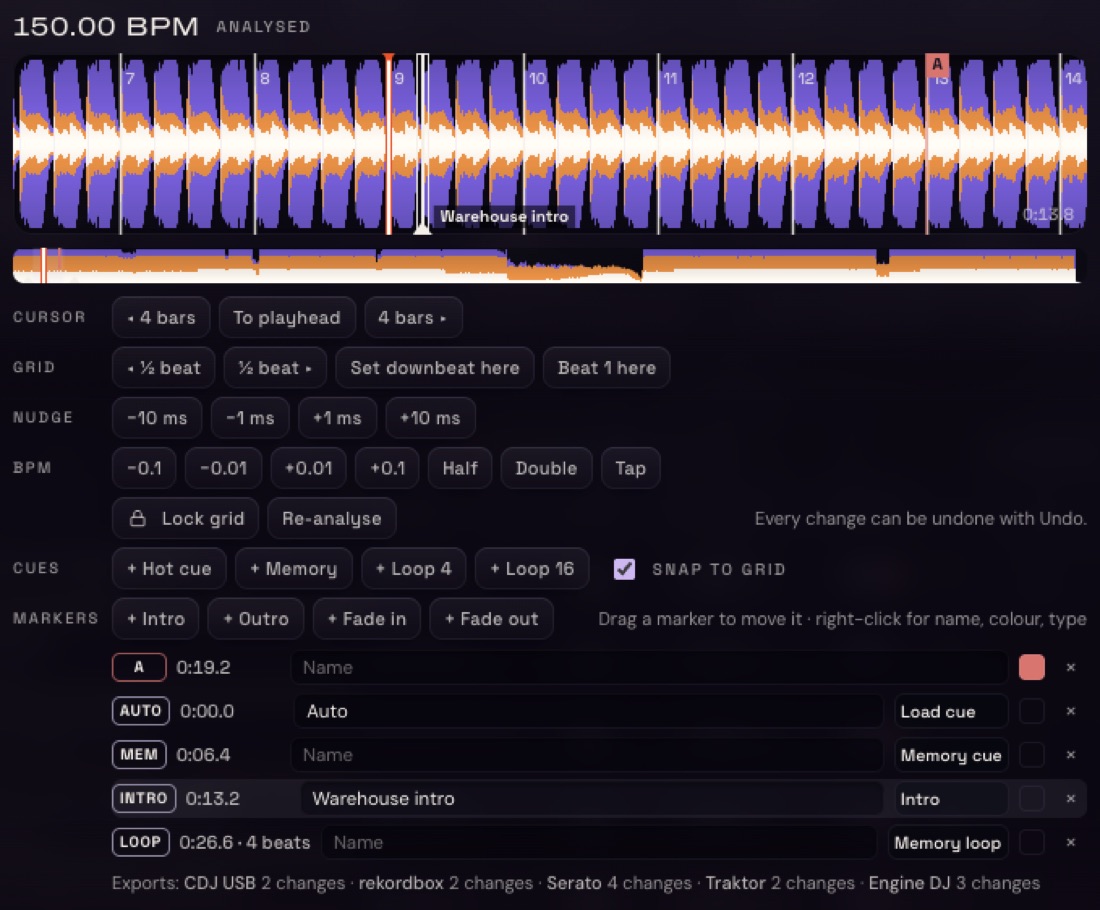
- Export your playlists from ATLAS to a pen drive or SSD, plug it into the CDJ, press USB and play. Your playlists and folders are there in the same order, with cue points, loops, beat grids, BPM, key and waveforms. No rekordbox needed.
- PLAYERS
- CDJ-2000, CDJ-2000NXS and NXS2, CDJ-3000, and the XDJ players that read a rekordbox USB (XDJ-1000MK2, XDJ-RX3, XDJ-XZ and older). The CDJ-2000 and CDJ-2000NXS show hot cues A to C.
- THE DRIVE
- Format it FAT32 (in Disk Utility: MS-DOS (FAT), Master Boot Record) and every player reads it. exFAT only works on the CDJ-3000, XDJ-XZ and XDJ-RX3, and ATLAS warns you before it writes to one.
- FILES
- Tracks the players can't play (FLAC, ALAC, Ogg) go onto the drive as AIFF copies. Your own files are never changed. Tick rekordbox XML as well and the same drive carries a rekordbox.xml too.
- FX
- Reverb and echo ring out when you switch them off (trails). A new GATE effect. No more stray sound when an effect is switched on.
- HEADPHONE CUE
- Cueing on a second sound device (speakers on one, headphones on another) is cleaner, with no dropouts.
- MASTER FILTER
- The FILTER label is now an ON / OFF switch. Off keeps the knob where it is. It can be MIDI-learned.
- USB BROWSING
- Drives you plug in show up in the Library and in Perform. Open one to browse the rekordbox, Serato or Engine library on it, load straight to a deck, or import it.
- SETTINGS
- Settings opens inside Perform (the ⚙ button or ⌘,) and the decks keep playing.
NEW IN 2.4.2 · 11 NOV 2026
- UPDATES
- ATLAS tells you when a new version is out: an UPDATE AVAILABLE card with what's new and a Download button (in Perform, a one-line note only). It never installs anything by itself. Settings › About shows the version and Check for updates.
- AFTER REC
- When a recording stops, SAVE SET AS PLAYLIST keeps the tracks in the order you played them, and OPEN SET IN MIX turns your real transitions into an Automix plan.
- STUDIO
- The headphone preview keeps playing while a deck is on air, and Play never misses a click.
- AUTOMIX
- A cut between very different tempos (126 → 70) ends with an echo locked to the new track's beat.
- PERFORM
- SUGGEST NEXT reads on small screens and with 4 or 6 decks. SYNC on a key-locked deck settles on the beat within a second. Space in BROWSE previews in the headphones. The STEMS chip can be MIDI-learned. Your saved layout comes back after a reload.
- LIBRARY
- Searching "128" finds BPM, titles and artists, not folder names. Playlist rows stay still under the mouse.
NEW IN 2.4.1 · 10 NOV 2026
- SYNC
- Seeks, hot cues, beat jumps, loop exits and scratching keep every synced deck on the beat. Half and double stay on the kicks.
- SLEEP + WAKE
- BPM stays steady after the laptop sleeps. A new sound device or sample rate keeps the decks playing, and REC stops cleanly with its tracklist.
- SUGGEST NEXT
- Adds OTHER TEMPOS, skips tracks already on a deck and follows each deck's real tempo.
- PLAYLISTS
- Drag a deck's track into a playlist, make one with +, drag-reorder in BROWSE with auto-scroll, remove with Delete or right-click, ⌘Z undoes it.
- WAVEFORMS
- Grab and scrub the top waveforms. Beat jumps never move a loop past the track's start or end.
- MIX VIEW
- Play, pause and stop the whole mix and hear each transition right there, on speakers or headphones.
- PREVIEW
- Play buttons on Arrange, Range, Export and every suggestion list; Space plays the selected track. Previews never reach the master on air.
- KEY MAP
- Shows matches under a genre filter, with the ones outside it dimmed and labelled.
- NEVER SILENT
- If a subscription ends mid-set the music keeps playing on its grace time, and never goes quiet.
THE KEYS, THE GEAR, THE FORMATS
USE CASES
HOW IT GETS USEDHOW IT WAS BUILT
TEN STEPS FROM SKETCH TO RELEASESEE IT
THE FILM + THE REAL APP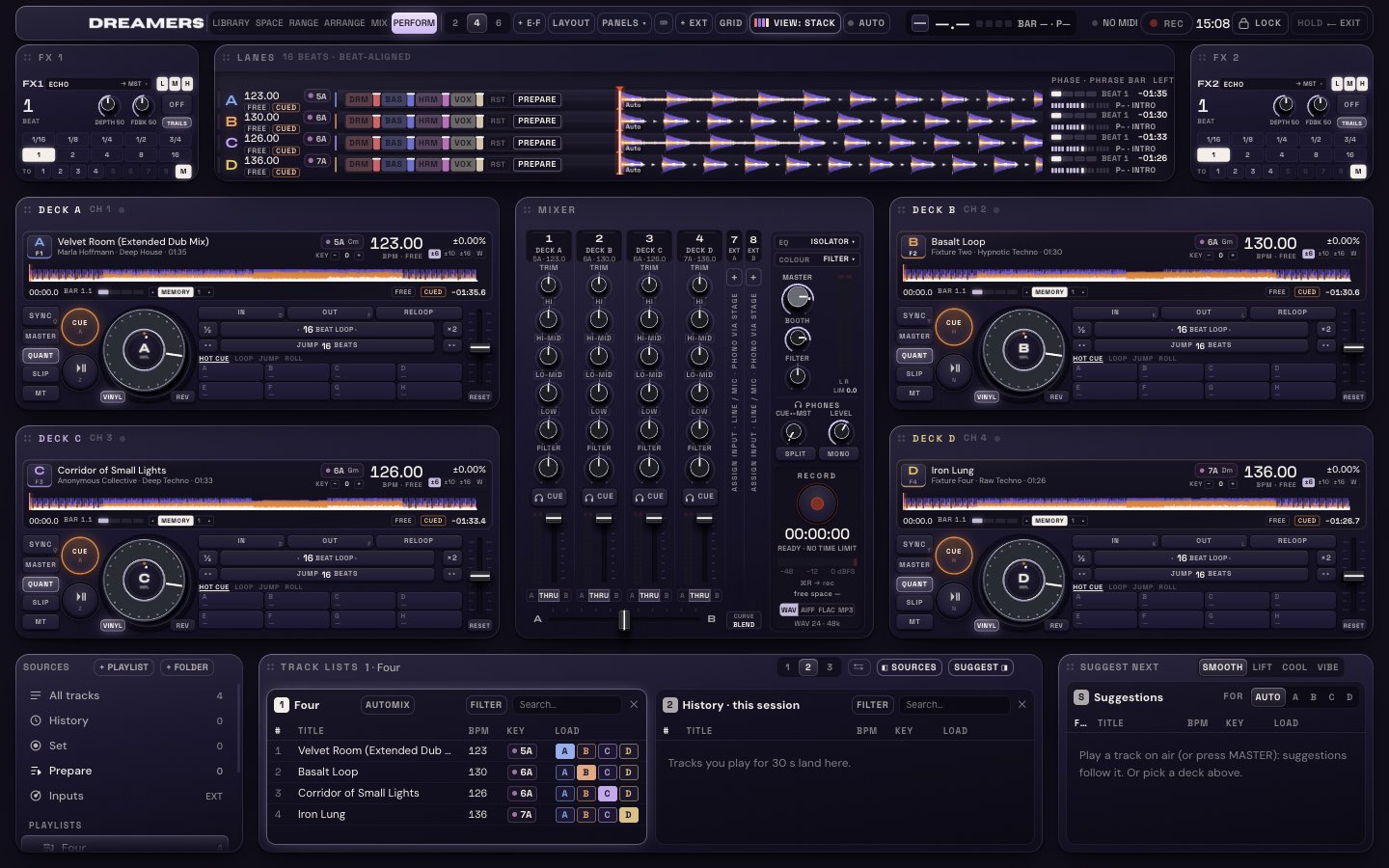
SPECS + LICENCE
WHAT YOU NEED · WHAT YOU GET- SYSTEM
- Apple Silicon on macOS 13 or later, plus a second download for macOS 11 and 12 and for Intel Macs (new in 2.4.6, not yet tested on a real older or Intel Mac)
- ANALYSIS
- BPM, key (Camelot, Open Key or musical), energy 1–10 and genre, worked out from the audio, offline
- FORMATS
- About 30: MP3, WAV, AIFF, FLAC, Ogg, Opus, M4A (AAC / ALAC), WavPack, Monkey's Audio, DSD and more
- PERFORM
- 2, 4 or 6 decks · up to 8 mixer channels (decks + EXT A / B) · 4 FX units, 21 effects · 3-band or 4-band EQ · 4 stems per deck
- RECORDING
- WAV, AIFF, FLAC and MP3 at once, any length, with .cue and .txt tracklists
- CDJ USB
- Playlists, cue points, loops, beat grids, BPM, key and waveforms on a FAT32 pen drive or SSD · CDJ-2000 to CDJ-3000, XDJ-700 to XDJ-RX3 and XDJ-XZ · no rekordbox needed
- TALKS TO
- rekordbox, Serato, Traktor, Engine DJ, VirtualDJ, Mixxx, Apple Music, M3U / PLS / CSV
- TRIAL
- 20 minutes of real use, free, with a DREAMERS account
- LIFETIME
- ₹24,999 · one payment · one computer at a time · works offline forever once bought
- MONTHLY
- ₹699 a month on autopay (UPI or card, cancel any time) · or a one-time 30-day pass that never auto-renews
DOES IT MOVE OR CHANGE MY FILES?
Copy is the default: ATLAS copies tracks into its own library folder and your originals stay where they are. Tags are written without touching anything else in the file (cover art, other apps' cue data). Every arrange, move and edit can be undone.
CAN I BRING MY REKORDBOX OR SERATO LIBRARY?
Yes. File › Import takes playlists, cues, loops, grids and colours from rekordbox (XML), Serato, Traktor, Engine DJ, VirtualDJ, Mixxx and Apple Music, and shows every match and conflict before anything changes. Export goes the other way.
CAN I PLAY FROM CDJS WITHOUT REKORDBOX?
Yes. Choose the export Pioneer CDJ USB, pick your playlists and a pen drive or SSD, and press Export. On the CDJ press USB, then browse PLAYLIST: your playlists, cue points, loops, beat grids, BPM, key and waveforms are already there. Format the drive FAT32 (MS-DOS (FAT), Master Boot Record) so every player reads it; exFAT only works on the CDJ-3000, XDJ-XZ and XDJ-RX3. Tick rekordbox XML as well if you want a rekordbox.xml on the same drive.
WHICH PIONEER PLAYERS DOES THE USB WORK ON?
The CDJ-2000, CDJ-2000NXS and NXS2, CDJ-3000, CDJ-900NXS, and the XDJ players that read a rekordbox USB, such as the XDJ-1000MK2, XDJ-RX3 and XDJ-XZ. The CDJ-3000X, CDJ-1500X, XDJ-AZ, XDJ-AN, OPUS-QUAD and OMNIS-DUO read only rekordbox's newer OneLibrary, so they will not show these playlists.
DOES IT NEED THE INTERNET?
Analysis, the library and Perform all run offline. Signing in and the free trial need a connection. A lifetime licence then works offline forever; a monthly one checks in at least once every 14 days.
WHAT HAPPENS WHEN THE TRIAL ENDS?
You can still open your library and settings, but nothing plays, processes or exports until you buy or subscribe.
WILL MY CONTROLLER WORK?
ATLAS ships mappings for 16 Pioneer DJ and AlphaTheta units, written from each maker's published MIDI list. Any other controller maps through MIDI LEARN, where every Perform control and every keyboard action can be learned.
HOW DO UPDATES WORK?
While you are online and signed in, ATLAS checks dreamersbyclover.com for a newer version and shows what's new with a Download button. Download the new version from your account, drag it into Applications, and your licence, library and settings stay as they are.
IS ATLAS IN THE STUDIO BUNDLE?
No. ATLAS is always sold on its own. The STUDIO BUNDLE (₹5,999) has every other DREAMERS plug-in and app.
10 / DREAMERS ATLAS
YOUR LIBRARY,
MAPPED.
₹24,999 LIFETIME · ₹699 / MONTH